


Weather Radar Live Map
4.7550.00 Reviews
App Specs
- Version
- 1.0.19
- Updated On
- License
- Free
- Downloads
- 100,000+
- Developer
- LeoStudio Global Ltd.
- Categories
- Weather
- Platform
- Android
Screenshots
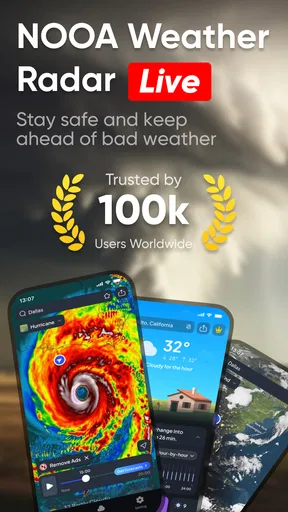
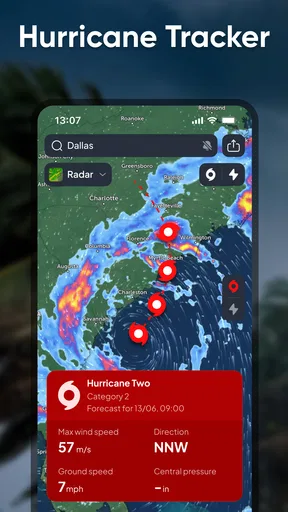
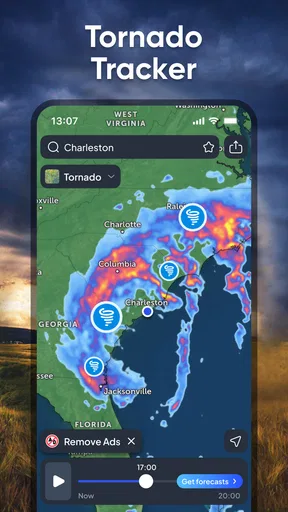
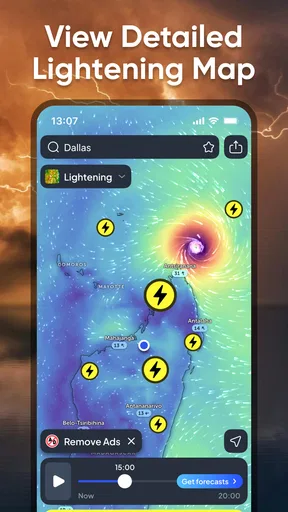
 Analysis by AppCompare
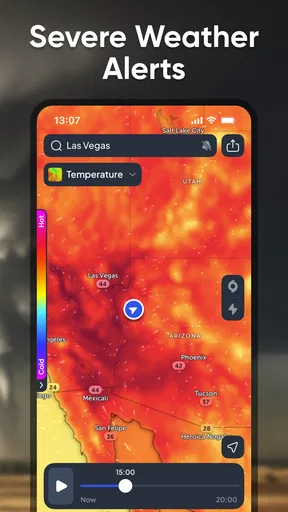
When I’m deciding whether to carry a raincoat or shift an outdoor plan, I want more than a general forecast: I want a quick sense of what is moving toward me. That is the appeal of Weather Radar Live Map. It is a weather app built around looking at conditions on a map, and I find that visual approach useful when a shower’s timing matters more than a broad summary.
A practical first check
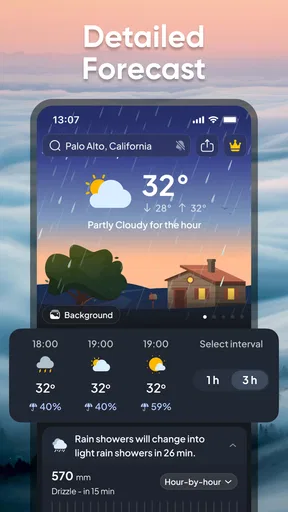
My basic routine is simple: open the map, look at the weather near my location, and check the forecast before committing to a plan. The map makes it easier to think in terms of nearby conditions and movement rather than treating a chance of rain as an abstract number. For deciding whether to walk now or wait a little, that can be more immediately useful than a standard forecast screen.
I would still treat radar as one piece of the decision, not a promise about exactly what will happen at my front door. A useful habit is to check the map once when planning and again shortly before leaving. If the picture has changed, I can adjust; if not, I have a little more confidence in the plan. That repeat check is especially worthwhile when the weather looks unsettled.
Settings that make a difference
The app lets me focus on different weather elements, including temperature, precipitation, wind speed, and humidity. Rather than trying to watch everything at once, I’d choose the layer that answers the question I actually have. For a walk, precipitation may be the priority; for a warm afternoon outside, temperature and wind may matter more. Switching the focus to suit the decision keeps the map easier to read.
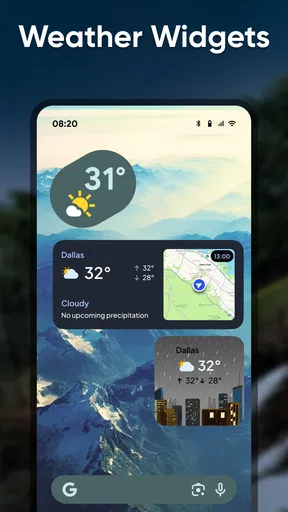
The home-screen widget is helpful for quick checks, but I see it as a starting point rather than a replacement for opening the app. It can make a routine glance more convenient; if I need to understand how a storm is developing, I’d move to the radar view instead. Keeping those jobs separate is a small workflow improvement: the widget handles “what’s the general picture?” and the map handles “what is happening nearby?”
Where radar helps most
Storm tracking is one of the app’s clearest strengths. Watching weather patterns progress can help me judge whether an outdoor errand is worth starting or whether it makes more sense to wait. The radar refreshes regularly, and severe-weather notifications can provide another prompt to check conditions. I would not rely on a notification alone when safety is involved; I’d use it as a reason to consult current local guidance and make a cautious choice.
For example, if I have a short walk planned and the sky looks changeable, I can check the radar before leaving, then look again while getting ready. If rain appears to be approaching, I can take an umbrella or postpone the walk. For a longer outing, I would also consider the forecast and conditions along the route rather than assuming that the weather over my current location tells the whole story.
Worth Reading Before You Choose

EA SPORTS FC Mobile 26 Is a Bigger Football Game, but It Takes Time

Flipboard Shows What News Apps Must Do Beyond the Feed

Switching to Android Auto Means Rethinking Your Driving Routine

Google Calendar Makes a Crowded Week Easier to Manage

Ludo King Makes the Most of the Minutes Between Plans

Baby Panda World Brings Quick Play to Modern Phones, but Its Game Library Feels Busy
How it fits alongside other forecasts
Compared with a conventional weather app that leads with a daily summary, this one puts more emphasis on the map. That makes it a good companion when timing and nearby movement are the main questions. A standard forecast can be quicker for checking the day’s expected high or planning several days ahead, while a radar view is easier to interpret when I want to see whether rain is close. I would use whichever format answers the question at hand instead of expecting one screen to do everything.
In my comparisons with other weather sources, the short-term outlook has generally seemed useful, while forecasts further out have felt less dependable. That is a reason to revisit plans as the day approaches, not a reason to treat any single app as exact. Weather changes, and a map that looks reassuring at one moment is not a guarantee that conditions will remain the same later.
Who will get the most from it
I can see this working well for people who make frequent decisions around short outdoor trips: commuters walking between stops, dog owners, parents planning time at a playground, or anyone deciding whether to bring a rain layer. It is also a natural fit for users who understand information more quickly when they can see it laid out geographically. The customizable weather elements help keep that view relevant rather than forcing every user into the same priorities.
It is less compelling if all I want is a quick temperature and a simple multi-day outlook. Someone who rarely checks radar may find a map-focused screen unnecessary, and anyone planning a long trip should compare conditions across the route using broader forecasts as well. I would also keep official local alerts in mind during serious weather; a consumer app is useful for awareness, but it should not be my only source for urgent decisions.
Free access and the upgrade question
The app is free to download, and there is a premium option for people who want additional features, including an ad-free experience or more detailed radar data. I have not found a need to upgrade for my ordinary checks. Before paying, I’d first use the free experience for the situations that matter to me and decide whether the extra detail changes what I do. If a basic glance already answers the question, paying may not add much value.
Weather Radar Live Map is made by LeoStudio Global Ltd. It has a 4.6 average from around 7,500 ratings, with more than 100,000 installs, and it is rated for Everyone. The app was released on July 18, 2024; version 1.0.19 requires Android 8.0 or later. Optional in-app purchases range from $1.49 to $39.99 per item. Those details make it easier to judge the commitment: trying the app costs nothing, while spending is a separate choice.
What to keep in mind during everyday use
The most useful pattern I’ve found is to avoid checking the radar compulsively. I use the widget for a quick overview, open the map when precipitation timing matters, and check again before a plan that would be inconvenient in bad weather. That gives the app a clear role without turning every small forecast change into a reason to revise the day.
There are trade-offs. A visual map can make approaching weather easier to grasp, but it still takes interpretation, and a moving patch does not automatically tell me exactly when rain will reach a particular street. The app’s alerts can be convenient, but I would keep notifications enabled only if they are useful to my routine; otherwise, they can add noise without improving the decision. Choosing a relevant weather layer and checking at sensible moments matter more than staring at every available detail.
For questions about whether it replaces a usual forecast app, my answer is no: I’d use it alongside a simple daily outlook if I need both a broad plan and a close look at rain. If the widget is enough for a quick glance, there is no need to open the full map every time. And if the weather is severe, I would check authoritative local warnings rather than treating a consumer radar as a safety guarantee. Those boundaries make the app more useful, not less; they keep expectations realistic.
Features That Stand Out
First off, the Weather Radar Live Map app does exactly what it says on the tin. It provides real-time weather updates with a radar map that's both intuitive and detailed. When you open the app, you’re greeted with a vibrant map showcasing weather patterns in your area. The interface is sleek and user-friendly, which is a huge plus if you’re like me and tend to get overwhelmed by too much information at once.
One of the coolest features is the ability to track storms. Seriously, you can watch the progression of storms in real-time. The radar updates every few minutes, so you’re always in the loop. Plus, there’s an option to receive notifications for severe weather alerts. This is particularly handy if you’re planning outdoor activities and need to know if Mother Nature is about to rain on your parade.
Customizable Experience
Customization is another area where this app shines. You can personalize the settings to focus on specific weather elements like temperature, precipitation, wind speed, or humidity. This level of customization makes it easy to tailor the app to your specific needs. Whether you’re a casual user or a weather geek, there’s something here for everyone.
There’s also a handy widget feature, which I find super useful. You can set up the widget on your home screen to get instant weather updates without having to open the app. It’s a small detail, but it makes checking the weather feel seamless and integrated into your daily routine.
Accuracy and Reliability
Now, let’s talk about accuracy. I compared the app’s weather updates with a couple of other sources, and I have to say, it holds up pretty well. The forecasts are generally spot-on, especially for short-term predictions. Long-term forecasts can be a bit hit-or-miss, but that’s pretty standard across the board. The data seems to be pulled from reliable sources, which is reassuring when you’re making plans based on the app’s predictions.
User Experience and Design
In terms of design, the app is quite visually appealing. The colors are vibrant, and the graphics are sharp. Navigation is smooth, and it didn’t take me long to figure out how to use all the features. The app doesn’t bombard you with ads, which is a breath of fresh air compared to some other free weather apps out there.
However, there is a premium version available if you want to unlock additional features, like removing ads entirely or accessing more detailed radar data. I haven’t felt the need to upgrade yet, but it’s nice to know the option is there.
Final Thoughts
All in all, the Weather Radar Live Map app is a solid choice for anyone looking to stay updated on the weather. Its real-time radar and customization options make it stand out from other weather apps. Whether you’re planning a picnic or just want to know if you need to grab a jacket before heading out, this app has got you covered.
Overall, I’d say give it a go. It’s free to download, so you’ve got nothing to lose. Plus, with its user-friendly design and reliable forecasts, it might just become your go-to weather app. So next time you’re wondering if it’s going to rain, just whip out your phone and let the Weather Radar Live Map app do its thing!
Pros
- Accurate real-time weather updates.
- User-friendly interface design.
- Customizable alerts and notifications.
- Comprehensive global coverage.
- Detailed weather maps and radar.
Cons
- Ads can be intrusive at times.
- Premium features require a subscription.
- Occasional loading delays in rural areas.
- Battery consumption is slightly high.
- Limited offline functionality.
FAQs for Weather Radar Live Map
What features does Weather Radar Live Map offer?
Weather Radar Live Map provides real-time weather updates, detailed radar maps, and severe weather alerts. Users can access hourly and weekly forecasts, track storms, and receive notifications about weather changes. It also offers customizable map layers and satellite views for a comprehensive weather analysis.
Is Weather Radar Live Map free to use?
The app offers a free version with basic features, allowing users to access essential weather information. However, to unlock advanced features such as ad-free usage, extended forecasts, and premium radar options, users will need to subscribe to the premium plan available within the app.
How accurate is the weather data in Weather Radar Live Map?
Weather Radar Live Map sources its data from reliable meteorological services, ensuring high accuracy. The app uses advanced algorithms and satellite imagery to provide real-time weather updates and predictions. While no weather app can guarantee 100% accuracy, users generally find it reliable for planning daily activities.
Can I customize notifications in Weather Radar Live Map?
Yes, the app allows users to customize notifications according to their preferences. You can set alerts for severe weather conditions, daily forecasts, and significant weather updates. The app also lets you choose the time and frequency of these notifications, ensuring you receive only the information that matters to you.
Is Weather Radar Live Map available on both Android and iOS?
Yes, Weather Radar Live Map is available for download on both Android and iOS platforms. Users can find the app on the Google Play Store for Android devices and the Apple App Store for iOS devices. It ensures compatibility with a wide range of smartphones and tablets.


